
Permissions
High precision user and role based permissions
You want to control who has access to your company. Depending on your industry, you may have to control who has access to approvals, manufacturing, and users. DataNinja makes this easy through Permissions settings; most permissions nestled under the permission field can be understood at a glance. Pay close attention to the “Create” and “Delete” permissions as you assign permissions to users. If you have questions about a specific permission, please contact us.
Important
Assign permissions to Roles instead of individual users whenever possible. Roles make things more scalable as the team changes over time, since you can just remove the user from roles to revoke permissions, rather than hunting down every permission granted to the user. You can define as many roles as are needed, and assign them to one or more users- there's no restrictions on the number of roles a user can have.
Note: Until a user or a role is given explicit permission for taking an action within DataNinja (like scanning materials into an electronic batch record) everyonehas that permission. As soon as you lock it down to just a given person or group then only those with the permission are allowed to perform the function. This significantly streamlines permissions management during implementation and in the future.
CFR 21 Part 11 Regulation states that user accounts cannot be shared, as it eliminates accountability for actions taken within the system. However, it's easy to decommission temp worker accounts and create new accounts, either in the UI or through the API.
Manage Permissions
To open the Permission page, click on the gear in the top right and click on 'Permissions' in the Settings column.
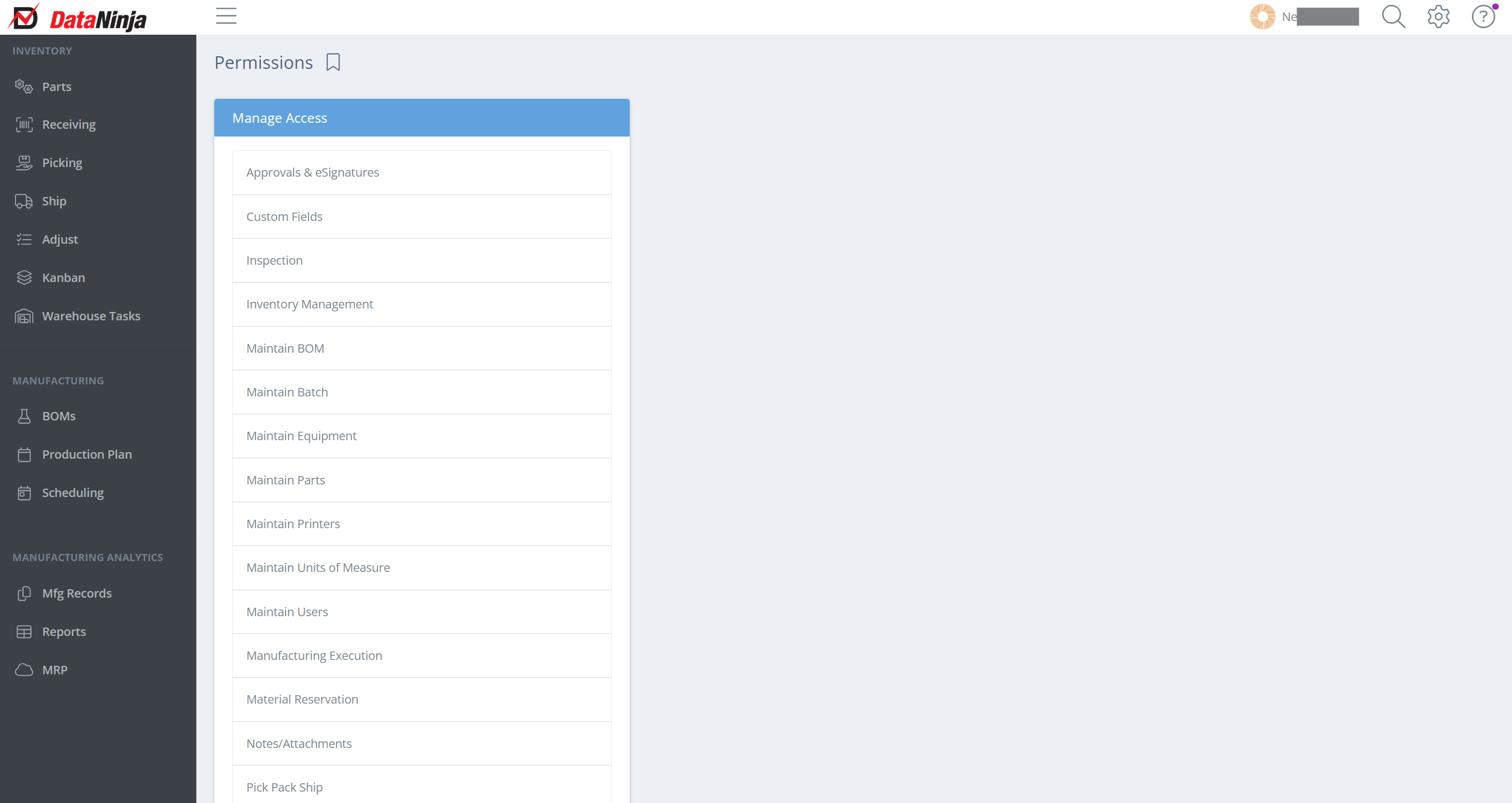
Screencap from v4.21.264.356
Each "Manage Access" area has multiple functionalities based permission controls. You can allow access by Team Role or by User. To remove a permission from a role or user, click the trash can to the right of the role/user name.
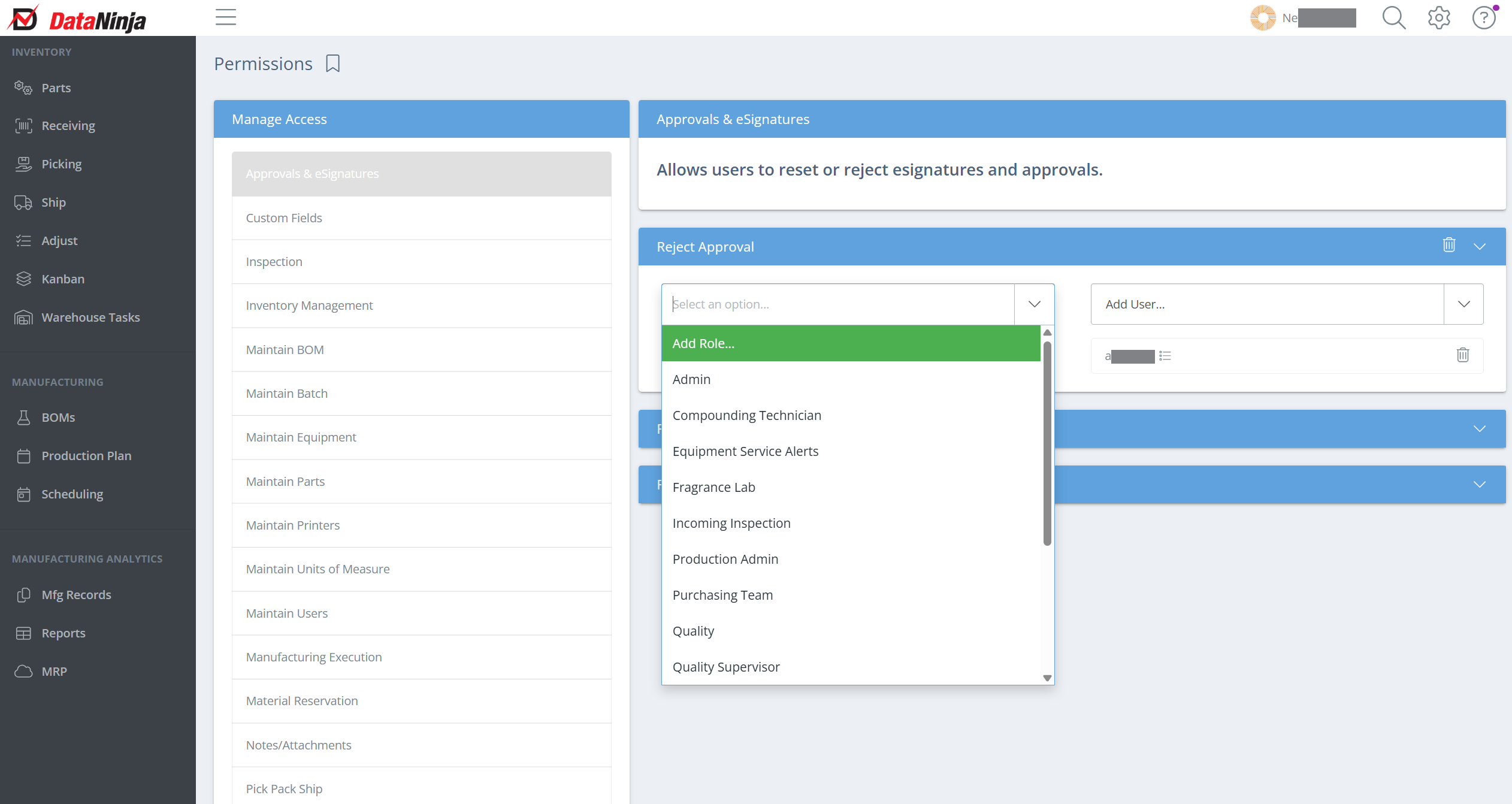
Screencap from v4.21.264.356
Explanation of Permissions
If no roles or users have been assigned to a permission, that action is currently open to all users. Once you assign at least one role or user to a subsection, access becomes restricted to only those assigned. Pay close attention to 'Delete' type permissions in particular, as those actions can be irreversible.
Approvals & eSignatures
Allows users to reset or reject eSignatures and approvals. QA and production roles should typically have access to these permissions.
| Permission | Description |
|---|---|
| Reject Approval | Allows the user to reject a BOM or inspection approval, sending it back for correction. |
| Reset Signatures | Allows the user to clear existing eSignatures on a record so signing can begin again from scratch. |
| Restart Approval | Allows the user to restart an entire approval workflow after it has been rejected or halted. |
Custom Fields
Allows users to create or update custom fields on supported objects. Without this permission, users cannot modify how data is captured on records. These permissions pertain to creating/deleting/updating custom fields on the API page; they do not restrict users from entering data into a custom field on a record.
| Permission | Description |
|---|---|
| Create Custom Field | Allows the user to add new custom fields to supported objects. |
| Delete Custom Fields | Allows the user to permanently remove custom fields. |
| Update Custom Field | Allows the user to edit existing custom field definitions. |
Inspection
Allows users to create or delete inspection roles, criteria, and attributes for incoming inspection as well as manage advanced inspection configurations for both manufactured and received materials.
| Permission | Description |
|---|---|
| Add Defects to Advanced Inspection Configurations | Allows the user to add defect types to an advanced inspection configuration. |
| Add/Update Recorded Inspection Attribute (appears twice — once for incoming, once for manufactured materials) | Allows the user to add or edit inspection attribute values recorded during an inspection event. |
| Create Advanced Inspection Configuration | Allows the user to build a new advanced inspection configuration. |
| Create Inspection Attribute | Allows the user to define new inspection attributes. |
| Create Inspection Criteria | Allows the user to define new pass/fail criteria used during inspections. |
| Create Inspection Role | Allows the user to create roles that can be assigned to inspection steps. |
| Delete Advanced Inspection Record | Allows the user to permanently remove a completed advanced inspection record. |
| Delete Inspection Attribute | Allows the user to delete inspection attribute definitions. |
| Delete Inspection Criteria | Allows the user to delete inspection criteria. |
| Delete Inspection Role | Allows the user to delete inspection roles. |
| Edit Advanced Inspection Record | Allows the user to modify a previously recorded advanced inspection record. |
| Mark Lot as Skipped During Receiving Inspection | Allows the user to bypass the inspection step for a specific lot at receiving. |
| Override Advanced Inspection Configuration | Allows the user to override the assigned advanced inspection configuration on a record. |
| Record Advanced Inspection Record | Allows the user to submit a new advanced inspection record. |
| Remove Recorded Inspection Attribute(appears twice — once for incoming, once for manufactured materials) | Allows the user to remove an inspection attribute value that has already been recorded. |
| Remove Defects from Advanced Inspection Configurations | Allows the user to remove defect types from an advanced inspection configuration. |
| Update Inspection Attribute | Allows the user to edit existing inspection attribute definitions. |
| Update Inspection Criteria | Allows the user to modify existing inspection criteria. |
| Update Quality Level of Advanced Inspection Configuration | Allows the user to change the quality level setting on an advanced inspection configuration. |
Inventory Management
Allows users to adjust or transfer inventory. Without these permissions, users cannot make any manual changes to inventory quantities or locations.
| Permission | Description |
|---|---|
| Adjust Inventory | Allows the user to manually increase or decrease inventory quantities. |
| Cycle Count Inventory | Allows the user to perform cycle count reconciliations. |
| Schedule Cycle Count | Allows the user to schedule upcoming cycle counts. |
| Scrap Inventory | Allows the user to write off inventory as scrap. |
| Transfer Inventory | Allows the user to move inventory between locations. |
Maintain BOM
Allows users to create, update, or delete BOMs (Bills of Materials). There are granular permissions around adding required parts, trackable attributes, labor steps, and labor attributes.
| Permission | Description |
|---|---|
| Create BOM | Allows the user to create new BOMs. |
| Create Process Attribute | Allows the user to add trackable attributes to a BOM process step. |
| Create Process Step | Allows the user to add labor steps to a BOM. |
| Create Required Part | Allows the user to add required components to a BOM. |
| Delete BOM | Allows the user to permanently delete a BOM. |
| Delete Process Attribute | Allows the user to remove process attributes from a BOM step. |
| Delete Process Step | Allows the user to remove labor steps from a BOM. |
| Delete Required Part | Allows the user to remove required components from a BOM. |
| Update BOM | Allows the user to edit BOM details. |
| Update BOM Lifecycle | Allows the user to change the lifecycle status of a BOM. |
| Update Process Attribute | Allows the user to edit existing process attributes. |
| Update Process Step | Allows the user to edit existing labor steps. |
| Update Approval Steps | Allows the user to modify the approval step requirements on a BOM. |
| Update Required Part | Allows the user to edit required component entries on a BOM. |
Maintain Batch
Allows users to manage batch inventory and batch properties. Batches are the key to traceability, and these permissions control who can modify batch records throughout their lifecycle.
| Permission | Description |
|---|---|
| Create New Batch Lifecycle | Allows the user to create new lifecycle stages for batch management. |
| Delete a Batch Lifecycle | Allows the user to permanently delete a batch lifecycle stage. |
| Update QC State of a Batch | Allows the user to change the quality control status of a batch. |
| Update Tare Weight | Allows the user to update the tare weight recorded on a batch. |
| Update a Batch Lifecycle | Allows the user to edit an existing batch lifecycle. |
| Update a Batch Potency | Allows the user to update the potency value of a batch. |
| Update Date of Expiration | Allows the user to change a batch's expiration date. |
| Update Display Identifier | Allows the user to modify the display identifier shown on a batch record. |
| Update Manufacturer Lot Number | Allows the user to update the manufacturer lot number associated with a batch. |
Maintain Equipment
Allows users to create or update equipment as well as create, update, and delete IoT connections. The person responsible for maintaining your DataNinja hub and printers will need IoT connection permissions.
| Permission | Description |
|---|---|
| Create Equipment | Allows the user to add new equipment records. |
| Create IoT Connection | Allows the user to establish a new IoT connection for a piece of equipment. |
| Create Equipment Service | Allows the user to log a new service entry for equipment. |
| Delete IoT Connection | Allows the user to remove an IoT connection. |
| Update Equipment | Allows the user to edit equipment record details. |
| Update IoT Connection | Allows the user to modify an existing IoT connection. |
| Update Lockout Status of Equipment | Allows the user to lock or unlock equipment, controlling whether it can be used in production. |
Maintain Parts
Allows users to create or update parts, maintain conversions, and create, update, or delete inspection criteria and attributes.
| Permission | Description |
|---|---|
| Create Part | Allows the user to add new part records. |
| Create Part Revision Approval Role | Allows the user to define approval roles for part revisions. |
| Delete Part | Allows the user to permanently delete a part record. |
| Delete Part Revision Approval Role | Allows the user to remove approval roles from a part revision. |
| Update Part Lifecycle | Allows the user to change the lifecycle status of a part. |
| Update Conversions | Allows the user to modify unit conversion settings on a part. |
| Update Part | Allows the user to edit general part details. |
Maintain Printers
Allows users to create or update printers. The person responsible for maintaining your DataNinja hub and printers will need this permission.
| Permission | Description |
|---|---|
| Create Printer | Allows the user to add a new printer to the system. |
| Select Label Template | Allows the user to assign or change the label template used by a printer. |
| Update Printer | Allows the user to edit an existing printer's settings. |
Maintain Units of Measure
Allows users to create or update units of measure and maintain conversions. Units of measure are key to receiving and production flowing smoothly.
| Permission | Description |
|---|---|
| Change the Unit of Measure Set for a Part | Allows the user to reassign which UoM set is applied to a part. |
| Clone Unit of Measure Set | Allows the user to duplicate an existing UoM set. |
| Create Unit Conversion | Allows the user to define a new conversion between units. |
| Create Unit of Measure Set | Allows the user to create a new UoM set. |
| Delete Unit Conversion | Allows the user to remove a unit conversion. |
| Update Unit Conversion | Allows the user to modify an existing conversion. |
| Update Unit of Measure Set | Allows the user to edit an existing UoM set. |
Maintain Users
Allows users to create, update, and delete users as well as set access or reset passwords. This permission controls who can manage other users' accounts in DataNinja.
| Permission | Description |
|---|---|
| Allow Access | Allows the user to grant a DataNinja account access to the system. |
| Create User | Allows the user to add new user accounts. |
| Delete User | Allows the user to permanently remove a user account. |
| Remove Access | Allows the user to revoke a user's system access. |
| Reset Password | Allows the user to trigger a password reset for another user. |
| Update User | Allows the user to edit an existing user's profile and settings. |
Manufacturing Execution
Allows users to create, update, and delete utilized part transactions, record and update process step attributes, update process checks, and manage equipment use in manufacturing. Users with these permissions can change what is used in production.
| Permission | Description |
|---|---|
| Add Utilized Part | Allows the user to record that a part was used in a manufacturing batch. |
| Add/Update Recorded Process Step Attribute | Allows the user to record or edit attribute values captured during a BOM process step. |
| Change BOM for Manufactured Batch | Allows the user to swap the BOM assigned to an active manufacturing batch. |
| Confirm Recorded Attributes | Allows the user to confirm that recorded process attributes are accurate. |
| Confirm Sample Set | Allows the user to confirm a sample set collected during manufacturing. |
| Create Correction Approval | Allows the user to initiate a correction approval workflow. |
| Delete Utilized Part | Allows the user to remove a utilized part transaction from a batch. |
| Issue Produced Materials During Manufacturing | Allows the user to issue finished goods to inventory directly from manufacturing. |
| Override Advanced Quality Check | Allows the user to bypass a required quality check during production. |
| Record Equipment Use | Allows the user to log which equipment was used during a manufacturing step. |
| Remove Equipment Use | Allows the user to delete a logged equipment use entry. |
| Remove Produced Quantity | Allows the user to remove a produced quantity record from a batch. |
| Remove Recorded Process Step Attribute | Allows the user to delete a previously recorded process step attribute value. |
| Scrap During Manufacturing | Allows the user to write off material as scrap during an active production run. |
| Update Recorded Process Check | Allows the user to edit a process check value that was previously recorded. |
| Update Utilized Part | Allows the user to edit a utilized part transaction on a batch. |
Material Reservation
Allows users to create, update, or delete material reservations. Without this permission, users cannot place holds on inventory for upcoming production.
| Permission | Description |
|---|---|
| Add a Material Reservation | Allows the user to create a new material reservation. |
| Delete a Material Reservation | Allows the user to permanently remove a material reservation. |
| Update a Material Reservation | Allows the user to modify an existing material reservation. |
Notes/Attachments
Allows users to create, update, or delete notes and attachments across records in the system.
| Permission | Description |
|---|---|
| Create a Note | Allows the user to add notes or attach files to a record. |
| Delete a Note | Allows the user to permanently remove a note or attachment. |
Pick Pack Ship
Allows users to create and manage shipments. Everyone in shipping will need some of these permissions.
| Permission | Description |
|---|---|
| Complete Sales Order / Quick Shipment | Allows the user to finalize a sales order or quick shipment. |
| Complete Shipment | Allows the user to mark a standard shipment as complete. |
| Create Quick Shipment | Allows the user to create a shipment without a formal pick process. |
| Create Shipment | Allows the user to create a new shipment record. |
| Delete a Shipment | Allows the user to permanently delete a shipment. |
| Edit Shipping Inspection Attribute | Allows the user to modify an inspection attribute recorded during shipping. |
| Pack Inventory | Allows the user to pack inventory into a shipment. |
| Record Shipping Inspection Attribute | Allows the user to capture inspection attribute values at the time of shipping. |
| Remove Shipping Inspection Attribute | Allows the user to delete a recorded shipping inspection attribute. |
| Reopen a Shipment | Allows the user to reopen a completed shipment for editing. |
| Update Packed Materials | Allows the user to modify the materials packed into a shipment. |
Planning
Allows users to create, update, or delete batches from the planning schedule.
| Permission | Description |
|---|---|
| Create Scheduled Batch | Allows the user to add a new batch to the production schedule. |
| Delete Scheduled Batch | Allows the user to permanently remove a batch from the schedule. |
| Update Planned Quantity | Allows the user to adjust the planned quantity on a scheduled batch. |
| Update Scheduled Batch | Allows the user to edit other details of a scheduled batch. |
Receive Materials
Allows users to receive new materials, open and close POs, and quick-receive materials.
| Permission | Description |
|---|---|
| Create Item Receipt | Allows the user to create a formal item receipt against a PO. |
| Edit Inspection Attribute | Allows the user to modify an inspection attribute recorded during receiving. |
| Open / Close PO | Allows the user to open or close a purchase order. |
| Quick Receive Materials – No PO | Allows the user to receive materials without an associated purchase order. |
| ReOpen Item Receipt | Allows the user to reopen a previously completed item receipt. |
| Receive Materials | Allows the user to receive materials against an open PO. |
Waves
Allows users to manage waves — including creating, updating, and deleting them — and delete the associated pick requests and pick events.
| Permission | Description |
|---|---|
| Create a Wave | Allows the user to create a new wave to batch picking tasks. |
| Delete a Pick Event | Allows the user to permanently delete a pick event associated with a wave. |
| Delete a Pick Request | Allows the user to permanently delete a pick request associated with a wave. |
| Delete a Wave | Allows the user to permanently delete a wave. |
| Edit a Wave | Allows the user to modify an existing wave. |
Updated about 2 months ago