
Scale Troubleshooting
Things to check when a scale is not communicating with DataNinja
Español: Lee esta página en español.
Français : Consultez cette page en français.
If a scale was working before but now isn't, double check cable connections, internet, and the Hub. Use cables that are known to work, and try power-cycling the DataNinja Hub. Also try connecting the scale to one of the blue USB ports as those get slightly more power than the others.
If multiple scales/USB cables are connected to the Hub, then the port assignments will be shuffled if the Hub is power-cycled. To avoid this, either use a powered USB hub (see Scale Setup), have only 1 cable connected to the Hub, or unplug all cables and then plug them in again. Port assignments will be determined by the order in which the cables are connected (ttyUSB0 - ttyUSB3).
You can also put weight on each of the scales, go to the Equipment page and find the relevant scales, then match them to the correct ttyUSB* based on the displayed weight.
You can also try opening the scale in the Equipment page in DataNinja and test reading weight from the scale (make sure there is actually weight on the scale).
If those steps don't resolve the issue, double check the scale settings and make sure that only 1 person/page is trying to read weight from the scale at a time.
Verify Scale Settings
In the scale settings, make sure the settings match the following:
- Baud rate: 9600
- Data Bits: 8
- Parity: none
- Stop bits: 1
- Stable: None/Off
- Handshake (aka flow control): none
- Auto printing or streaming menu area
- continuous or interval of 1 second
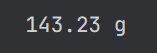
If the scale allows for control of how the data is sent, the typical format is: [net weight] [uom]
Contact DataNinja Support
If you have confirmed that the settings on the scale match the ones above and you've tried all the troubleshooting steps, reach out to the DataNinja team via chat. Provide details such as when the scale last worked, what page you're trying to use the scale on, screenshots, recordings, etc. Also include which scale is having the issue, and what Hub the scale is connected to.
Updated about 1 month ago