
Sync Overview
How/Where/When information syncs between Oracle NetSuite and DataNinja
Español: Lee esta página en español.
Français : Consultez cette page en français.
DataNinja has a Built-For-NetSuite approved SuiteApp, which can be found in the SuiteApp store. Through this app, DataNinja and NetSuite sync in both directions. NetSuite is master for all procure-to-pay and quote-to-cash workflows. DataNinja integrates with NetSuite Parts, Bills of Material, Inventory Details, Purchase Orders, Item Receipts, Sales Orders, Fulfillments, Transfer Orders, Inbound Shipments, Return Authorizations, Vendor Return Authorizations, Customers, Vendors, Bin Locations, Assembly Builds, and Work Orders.
How Often Data Syncs
Most DataNinja sites receive NetSuite changes through webhooks. When a record is saved in NetSuite, the SuiteApp notifies DataNinja right away, and the change usually shows up in DataNinja within a few minutes.
Changes made in NetSuite by scripts, CSV imports, or other automated processes are picked up by a check that runs every 15 minutes, so they can take up to about 15 minutes to arrive. A scheduled import also runs every hour to catch anything else.
Changes made in DataNinja, such as receipts, assembly builds, fulfillments, and lot status changes, are sent to NetSuite as sync jobs. You can follow each job, and retry any that fail, on the Sync Page.
Purchase Orders, Sales Orders, Fulfillments, Invoices
Purchase orders are sent from NetSuite into DataNinja. Receiving, incoming quality inspections, and unique lot numbers are saved in DataNinja. Once the incoming inventory is received and released in DataNinja, the inventory, with the unique lot number, is updated in NetSuite.
Inventory Items, Lot Numbered Inventory Items, Lot Numbered Assembly Items
NetSuite is master for all item creation. NetSuite's inventory items, lot numbered inventory items, and lot numbered assembly items all sync to DataNinja as DataNinja parts. Lot numbered inventory and assembly items are automatically assigned a unique lot number when received in DataNinja.
Lot Numbers
DataNinja generates unique identifier codes for inventory tracking automatically. Identifier codes consist of a unique, random combination of 8 numbers and letters.
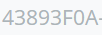
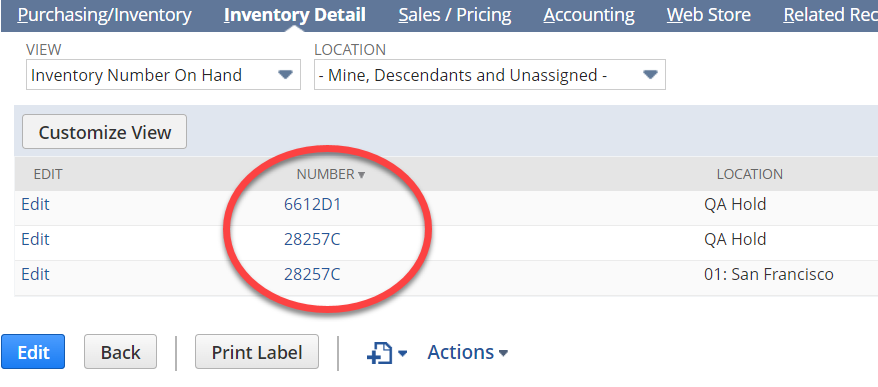
DataNinja lot numbers are passed into NetSuite as serial/lot numbers.
Inventory Levels and Lot Statuses
Inventory levels in DataNinja and NetSuite are maintained through receiving, manufacturing, and fulfillments. DataNinja manages inventory traceability from receipt of raw materials through finished goods shipment.
Lot statuses, including statuses such as Quarantined, Released, Hold, Rejected, or Scrapped, are managed in DataNinja. NetSuite receives the initial lot status and later status updates from DataNinja.
For status updates to sync correctly, the related receipt must first be completed/closed in DataNinja so the received inventory exists in NetSuite. If a lot is changed to Rejected or Scrapped before the receipt is completed, NetSuite may not reflect the rejection/scrap status because there is no posted received inventory record for DataNinja to update.
Manufacturing
Manufacturing may not be part of your NetSuite build. If it is, DataNinja will interact with NetSuite as described below.
DataNinja holds your recipes (MMR/BOM) and your detailed production records. This maintains inventory traceability from receiving raw materials to the sale of finished goods. By using production in DataNinja you can quickly lock-out raw materials and finished goods in the event of a recall (see How to Do a Mock Recall).
Manufacturing is scheduled on DataNinja's production calendar and flows to NetSuite as a Work Order (WO). WOs can also be started in NetSuite and DataNinja will import them automatically. If a WO is created in NetSuite, then it should be handled from NetSuite (aside from scheduling and production). DataNinja will only allow edits (like closing) to WOs created within DataNinja.
Production and quality control is performed in DataNinja and moves to NetSuite as an Assembly Build with a unique lot number.
Sales Orders
Sales orders are only generated in NetSuite, then moved automatically into DataNinja. Quickly allocate inventory to sales orders in DataNinja using barcode scanners. Fulfilling and shipping in DataNinja ensures complete traceability, from raw materials being received to finished goods going out the door. DataNinja only allows released finished goods to be shipped. Shipping in DataNinja associates the finished good lot number with the sales order, thus maintaining traceability from receiving raw materials to finished goods going out the door.
After a sales order is fulfilled in DataNinja the status of the sales order is changed from "Pending Fulfillment" to "Pending Billing", and the Item Fulfillment is generated in NetSuite.
Invoices exist and are maintained in NetSuite and do not sync to DataNinja.
Updated 10 days ago